Testing AI Agents
Introduction
Flowable Design lets you author automated tests for AI agent models and run them before an app is published. An agent test runs the agent for a given input and asserts on the result — the response text, structured output fields, guardrail outcomes or an extracted document — while mocking the external services the agent calls, so that the test is deterministic and does not depend on live systems.
An agent can be exercised in two complementary ways:
- Evaluate runs the agent once, ad hoc, for a given input — useful while you are designing the agent to see what it does. It does not store anything.
- Unit tests capture reusable, repeatable checks for an agent as part of the shared Model Testing framework, and are executed by Flowable Inspect.
The shared test-set concepts (test sets, the app-level Tests overview, import and export, publishing to Inspect and bulk runs) are described on the Model Testing page. This page focuses on what is specific to agents.
Which agents can be tested
Unit tests can be authored for every agent type except the orchestrator agent — that is, for utility, knowledge, document, external, A2A, guardrail and evaluator agents. Document agents that define document classifications additionally get a dedicated set of classification tests.
Agent operations offer two related surfaces, each enabled separately:
- Unit Tests — the persistent, repeatable test sets described on this page. This tab appears when Inspect testing is enabled.
- Evaluate — an ad-hoc tab for running the agent once with a given input to see what it does. This is handy while designing the agent, but it does not store anything. It appears when the agent-specific
enable-agent-testproperties are set (see Preconditions).
Preconditions
Agent unit tests run on a connected Flowable Work runtime through Flowable Inspect and require only the general Inspect testing setup — the AI specific properties need to be set.
The ad-hoc Evaluate tab uses a different setup: instead of the Inspect testing configuration, it requires the enable-agent-test properties on both the Design and the Work side:
# Flowable Design
flowable.design.agent.enable-agent-test=true
flowable.design.remote.idm-url= # URL to Flowable Work, e.g. http://localhost:8090

# Flowable Work
flowable.agent.enable-agent-test=true
Either way, the agent actually runs during a test, so it must be able to reach a language model — either through a per-agent API key in its advanced configuration, or through the globally configured API key on Flowable Work.
The Unit Tests tab
Open an agent model, open the operation you want to test from the Operations tab, and select the Unit Tests tab.
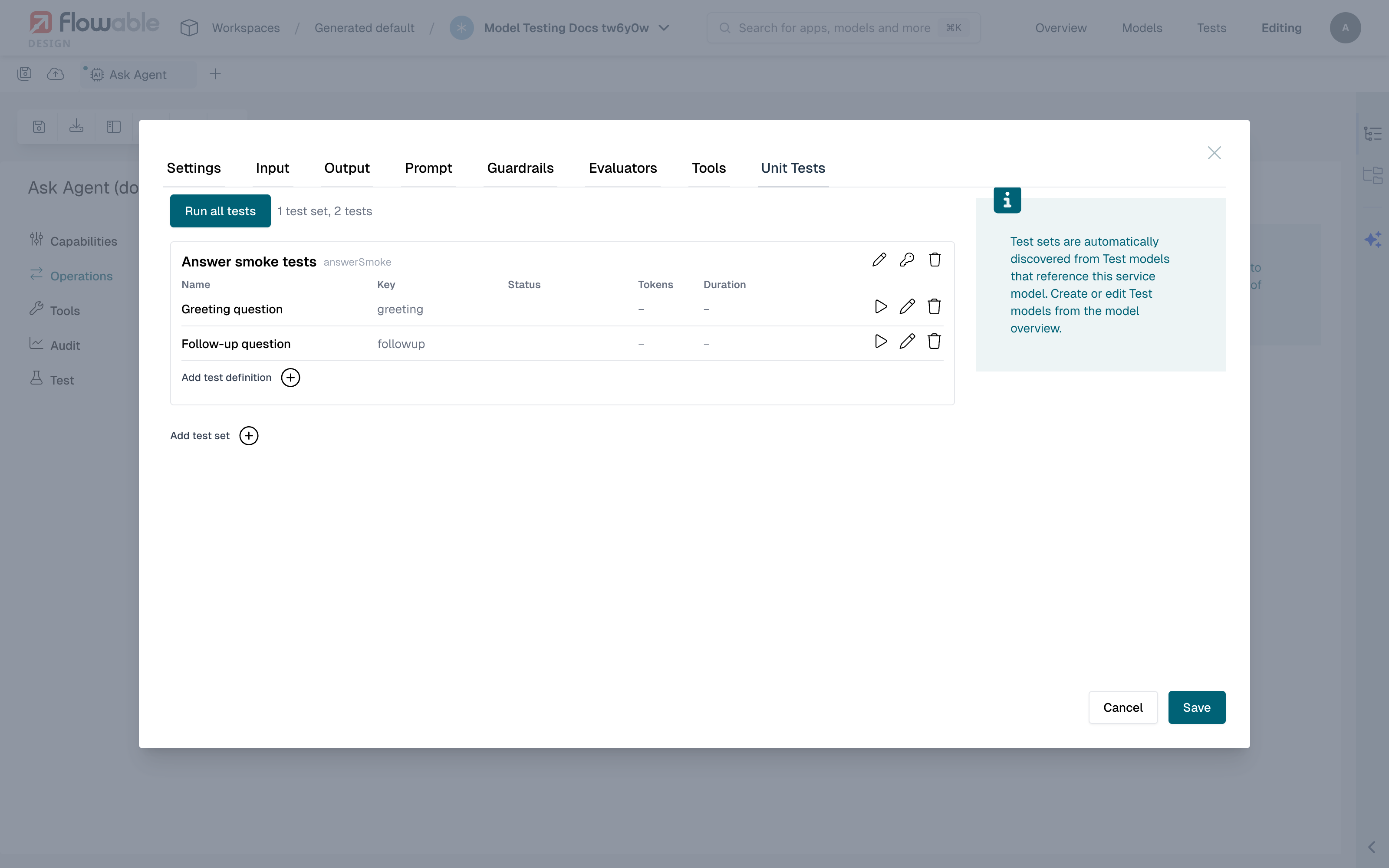
Use Add test set to create a test set (with a Name and Key; the operation is bound automatically) and Add test definition to add a test to it. Each test can be run individually with Run this test, or all at once with Run all tests; after a run, the toolbar reports how many tests passed or failed and each test shows a Passed, Failed or Skipped badge. A test can be excluded from Run all tests with Skip this test when running all tests.
What an agent test defines
A test definition (opened with Add test definition / Edit) has a Name and Key and the following sections:
- Input Parameters — the values passed into the agent for this run. For an agent that takes free text, this is a single text input; for an agent with structured input parameters, each parameter is filled in individually; for a document agent, a document is uploaded (see Testing document agents).
- Service mocks — how the services the agent calls should behave during the test (see Mocking services, tools and guardrails).
- Expected Output — one or more assertions compared against the agent's result. Use Add assertion, choose the parameter to check, pick an Operator and provide the expected value.
An assertion can target:
- the agent's final response text;
- any structured output parameter the operation declares;
- a guardrail outcome — whether a guardrail passed, its confidence, the action it took and the reason, exposed as parameters labelled Guardrail · <name>;
- an evaluator score, exposed as parameters labelled Evaluator · <name>.
The available operators depend on the type of the value being checked — for example string operators such as equals, contains and matches regex, numeric operators such as greater than and between, and object/array operators.
Mocking services, tools and guardrails
The value of an agent test comes from being able to run the real agent while controlling what its external calls return. When you open a test definition, Design automatically discovers every service the agent invokes — as a tool or as a service-based guardrail — and lists them in the Service mocks section, one row per call.
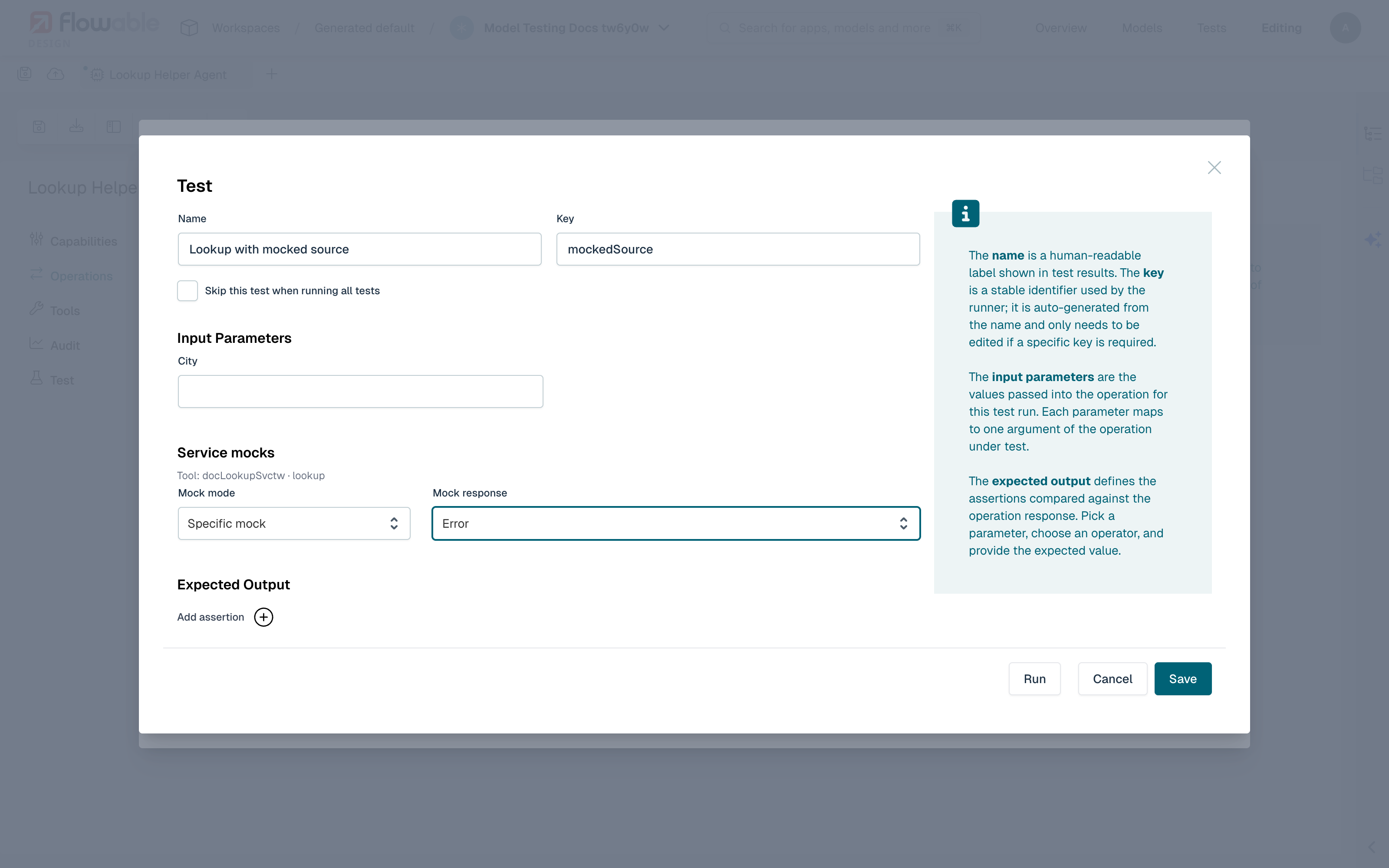
Each row is labelled with the call it represents (for example Tool: <service> or Guardrail: <service>) and has two controls:
- Mock mode:
- No mock — the agent makes the real call to the external service.
- Auto — a mock response defined on the service is selected automatically, using the service's normal priority, match condition and sampling rules.
- Specific mock — a particular mock response is used, regardless of the service's own selection rules.
- Mock response — enabled only for Specific mock, this lists the mock responses defined on the referenced service model, so you can pin exactly the success or error scenario you want to test.
By pinning a specific mock you can, for example, verify that the agent takes its error-handling path when a tool call fails, or that it produces a particular answer when a lookup returns a known value — every time the test runs, without the external system being involved.
 info
infoOnly services called through the service registry can be mocked this way, including service-based guardrails. Guardrails that are themselves AI agents (LLM-based judges) always run for real; assert on their outcome through the Guardrail · <name> parameters.
Testing document agents
For a document agent, the input to a test is a document rather than text. In the test definition, upload a file (drag it onto the upload area or browse for it); it is stored with the test set and travels with it when the test set is exported or imported. Use the Remove control to swap the document.
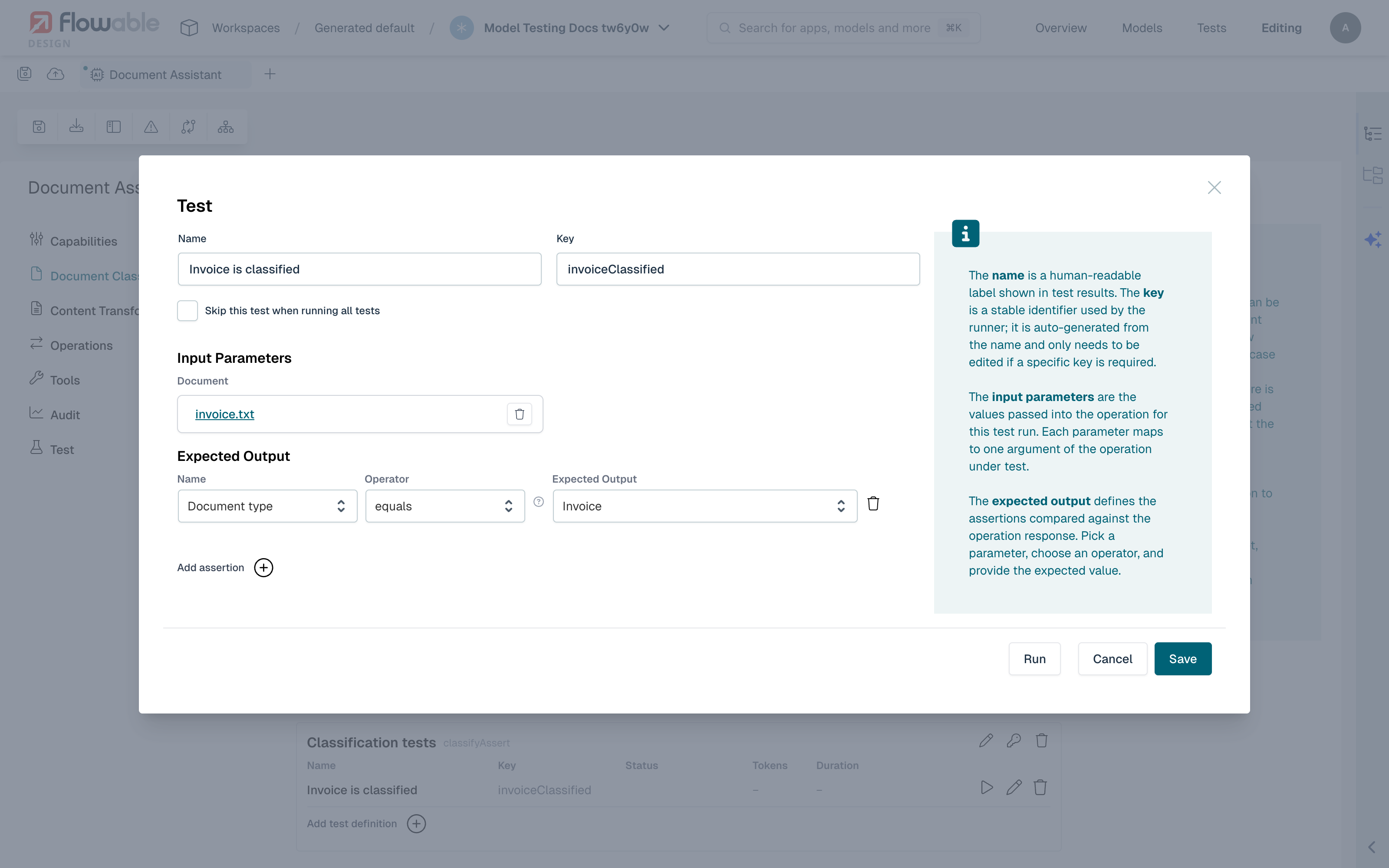
What you assert on depends on the agent's operation. A data-extraction agent, for example, exposes the extracted metadata as a single parameter you can assert against, so you can check that the agent pulled the right values out of the uploaded document.
Testing document classification
When a document agent defines document classifications, an additional Unit tests section appears on its Document Classification tab. These tests check that a document is classified as the expected type.
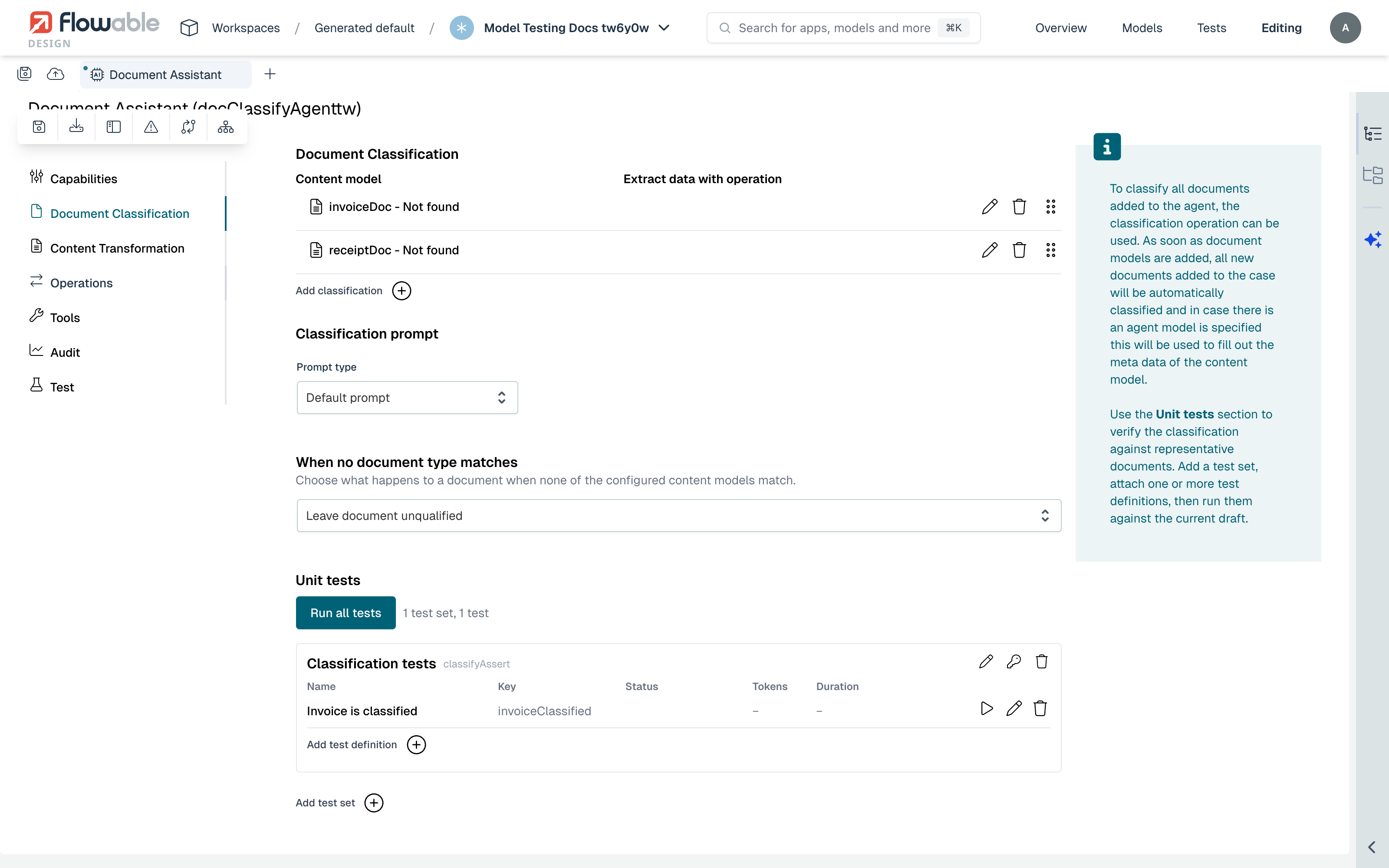
Each classification test uploads a document and asserts the predicted Document type against an expected value. The value list contains the document types configured on the agent plus a No matching document type option, so you can test both the classes you expect to match and the documents that should match none of them.
Running tests and reading results
Runs execute remotely on Flowable Work through Inspect, exactly like process and case tests: Design deploys the agent and the models it references as a temporary deployment, runs the test, and removes it again.
For each test, the result shows the overall Passed / Failed / Skipped status. When an assertion fails, the detail shows the Expected and Actual values; when the run itself fails, a Test execution failed message shows the error. A run-details view additionally exposes the agent's steps, the tokens used, the duration and an execution trace, which is useful for understanding why an agent produced a given answer.
 warning
An agent's response is produced by a language model and is not fully deterministic. Prefer assertions that are robust to small wording differences (for example contains or matches regex on the response text, or checks on structured output and guardrail outcomes) over exact-match assertions on free text, and use service mocks so that the agent's tools behave the same way on every run.
Related pages
- Model Testing — shared concepts, overview, import/export and publishing
- Testing a Service Registry — defining the mock responses used above
- Guardrails and Evaluators — the outcomes you can assert on
- Setting up Flowable Inspect testing