Vector Store
A vector store is used to semantically index and search the processed chunks of knowledge base content. Flowable currently supports Elasticsearch, OpenAI Vector Store, and Custom implementations.
Each store comes with its own configuration requirements and capabilities.
Elasticsearch
Flowable supports vector-based retrieval using Elasticsearch, with customizable similarity metrics and embedding sources.
 info
infoFor searching in an Elasticsearch vector store it is required to have at least Elasticsearch version 8.x.
Supported Distance Types
- Cosine distance
- L2 norm
- Max inner product
Configuration Options
| Parameter | Description | Default |
|---|---|---|
| Top K | Number of most similar items to return | 4 |
| Num Candidates | Optimization parameter to narrow search scope | topK * 1.5 |
| Similarity Threshold | Filters out results below a given similarity score | 0 |
infoFor L2 norm, the similarity threshold is internally calculated as:
1 - similarityThreshold
Embedding Configuration
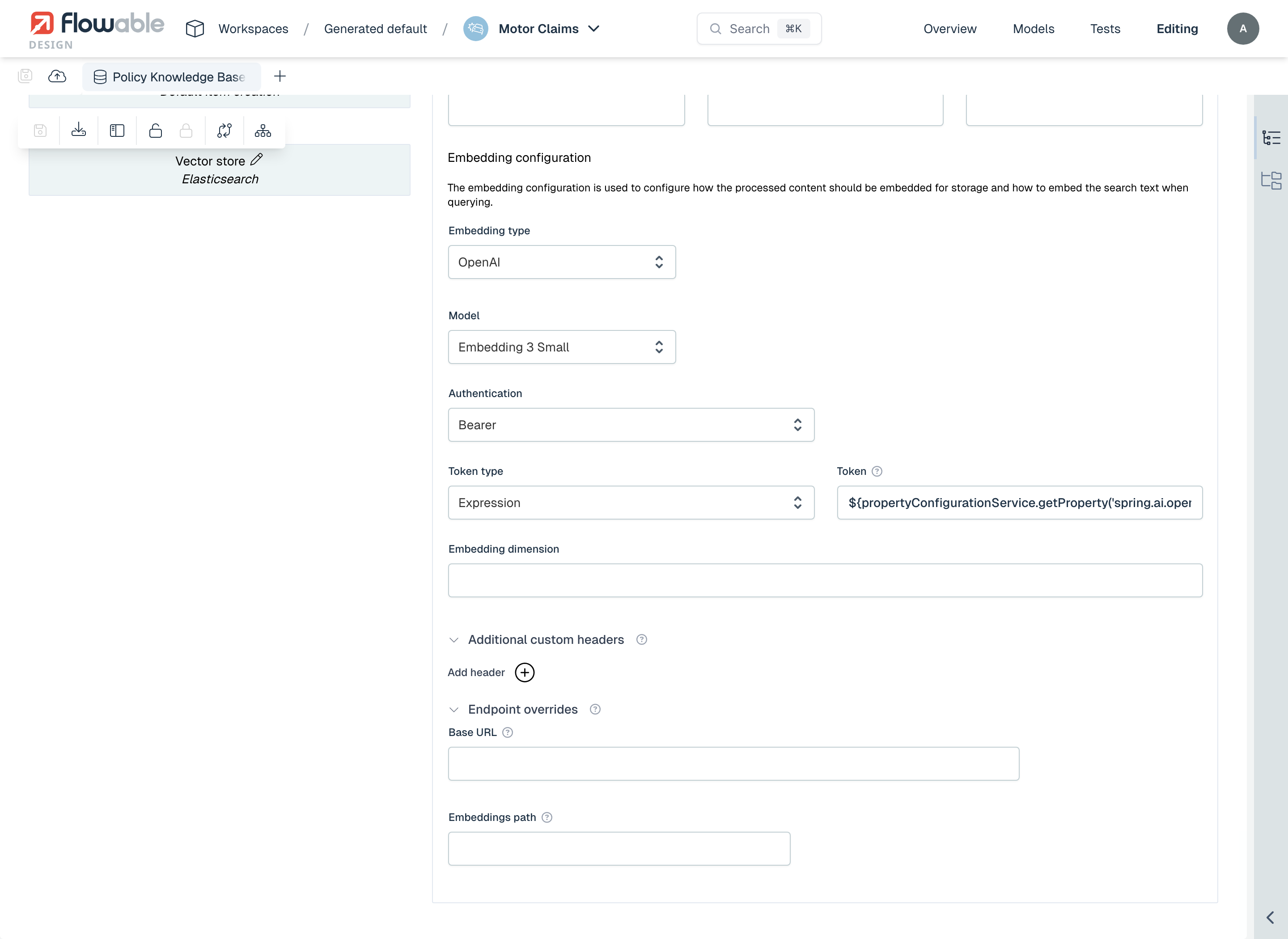
The quality and performance of the vector store depend on the embedding model used to generate vectors. Select the Embedding type (OpenAI, Azure OpenAI, or a custom implementation) and the Model, then configure how Flowable connects to the embedding provider.
OpenAI Embeddings
When using OpenAI (or an OpenAI-compatible provider) as the embedding provider:
- Model – Embedding Ada 002, Embedding 3 Small, Embedding 3 Large, or a custom model (specify the Embedding dimension when using a custom model).
- Authentication – How Flowable authenticates against the provider: No authentication, Basic, Bearer, X-API-KEY, or Custom Header, with the value provided as an expression, a secret, or an OAuth2 client.
- Additional custom headers – Optional extra HTTP headers sent on every embedding request.
- Endpoint overrides – A Base URL and Embeddings path to target an OpenAI-compatible endpoint. Requests are sent to Base URL + Embeddings path (default
/v1/embeddings).
Azure OpenAI Embeddings
To configure Azure OpenAI:
- Azure OpenAI Endpoint – URL of the Azure OpenAI endpoint, e.g.
https://<name>.openai.azure.com/openai/deployments/<deployment-id>/embeddings?api-version=2023-05-15 - Azure OpenAI Deployment ID – E.g.
text-embedding-3-small - Authentication – No authentication, Basic, Bearer, X-API-KEY, or Custom Header, provided as an expression, a secret, or an OAuth2 client. See Authentication.
- Embedding dimension – Must be explicitly configured (e.g.
1536)
Custom
 warning
The custom extraction APIs are currently experimental and may change in future releases.
For advanced use cases, you can implement your own embedder logic.
Implement the following Java interface: com.flowable.agent.engine.impl.knowledgebase.pipeline.steps.embedder.KnowledgeBaseEmbedder
OpenAI Vector Store
Flowable also supports integration with OpenAI’s native vector store.
Configuration Requirements
- Store name: Name of the store, the store will be created automatically
- Authentication: API-Key of OpenAI
Note that OpenAI handles indexing and similarity search internally, so no distance type or threshold is required on the Flowable side.
Custom
warningThe custom vector store APIs are currently experimental and may change in future releases.
You can implement your own vector store integration by providing a Java implementation.
Interface to implement: com.flowable.agent.engine.impl.knowledgebase.pipeline.steps.vectorstore.KnowledgeBaseVectorStore
This allows complete control over:
- Vector indexing
- Similarity search logic
- Integration with third-party or in-house search engines