Flowable Design/Control to Flowable Work Communication
The Flowable ecosystem consists of the 3 applications Flowable Work, Flowable Design and Flowable Control. In certain use cases, these applications have to communicate with each other:
- Flowable Design needs to deploy models to Flowable Work.
- Flowable Design needs to access Flowable Work API to get IDM data (available users and groups)
- Flowable Control needs to access Flowable Work Admin APIs to execute operations and get business and runtime metrics.
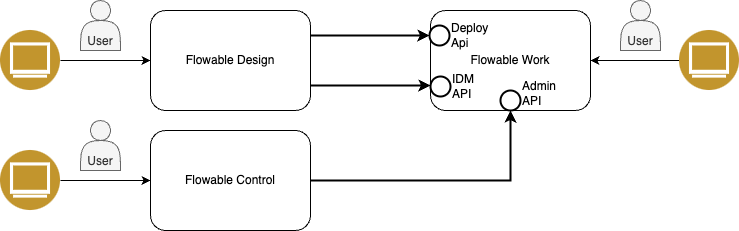
This page describes the different authentication options between Flowable applications and how they can be set up. It helps Flowable Cloud dedicated customers to understand the different options and to choose the best one for their requirements and their existing SSO setup.
Authentication Scenarios
The following authentication scenarios between Flowable applications are supported:
- OAuth2 Authentication
- Technical User Authentication
- Form-Login / BasicAuth Authentication (not recommended)
Some of these scenarios require you to have a specific SSO authentication mechanism configured for user login. For example, if you want to use OAuth2 authentication between Flowable applications, you also need to have OAuth2 configured for user SSO login.
For certain scenarios you also have to decide if the applications communicate with each other on behalf of the current user or with help of a technical user / service account.
OAuth2 Authentication
This authentication mechanism is based on an already working OAuth2 / OIDC Single-Sign-On setup to authenticate users for each Flowable application (Work/Design/Control). It uses the OAuth2 access tokens to authenticate the communication between the applications.
With OAuth2, the communication between the Flowable applications can either be established as the application itself (service account) or as the already authenticated user (user propagation).
Service Account (OAuth2)
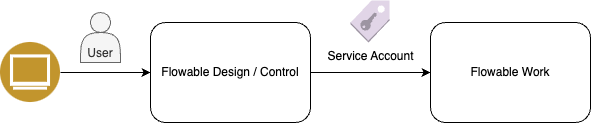
In this scenario, the communication between Design/Control and Work is established with a technical service account.
This authentication scenario requires you to setup individual OAuth2 Client Registrations for each Flowable application. Please refer to the Individual App Registration Setup chapter for more details on how to set this up.
 Benefits
- A User using Control or deploying apps with Design does not need to be an admin in Work.
- Communication between Design/Control and Work is decoupled from the login user.
- No refresh token is needed to handle the expiration on the access token as with every call, a new access token gets requested.
 Drawbacks
- Every Application needs its own Client Registration so you need 3 separate registrations for Work/Design/Control.
- Granting admin permissions to an application/service-account can be hard to configure depending on the used OAuth2 provider.
- Because the operation runs through a technical connection, the executing user is not visible in Flowable Work; auditing continues to be available and preferred in Control.
No actual service account user needs to be created. The Design/Control applications themselves will act as the "User" to access Flowable Work.
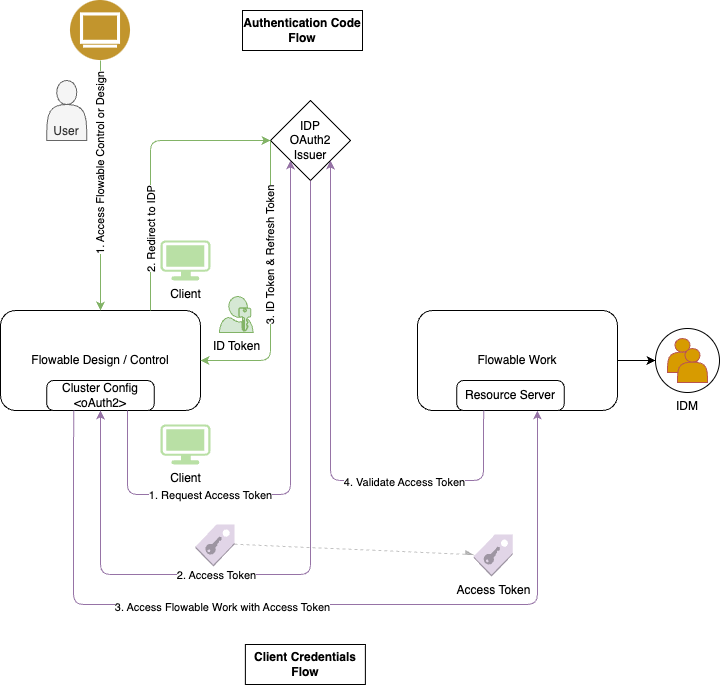
For this to work, every application needs its own Client Registration and therefore its own Client ID. The Design/Control application will then execute an OAuth2 Client Credentials Flow to request an access token.
 note
noteTo configure this in OAuth2, each Application needs its own Client Registration, resulting in 3 separate Registrations.
The Work Application needs to provide an API to which the Design/Control applications need to be permitted to.
Design/Control Service Account Principals need to be given Admin permission for the access to Work.
User Propagation (oauth2CurrentUser)
In this scenario, the communication between Design/Control and Work is established with the authentication token of the currently logged in user.

Benefits- Only 1 Client Registration is needed.
- The executing user is available for auditing access in Flowable Work.
Drawbacks- To be able to deploy apps from Flowable Design to Flowable Work, also appropriate deploy permissions on Flowable Work need to be given (see below).
- The user usually needs full admin permission also on Flowable Work if they want to use Flowable Control. With this, their user experience in Flowable Work might be impaired.
- Refresh token handling is needed to be able to access Flowable Work APIs after the initial access token has expired.
On a technical level, all 3 Flowable application Work/Design/Control are treated as 1 OAuth2 application. This allows us to forward the access token the user got at login from Design/Control to Work and therefore to access Work APIs as the same user that has been logged-in in Design/Control.
Because the access token will expire after a certain time (defined by the IDP), the refresh token, also issued on login, will be used to request a new access token. Access tokens used to access Work are cached on the Design/Control server either in the session or in memory (See Refresh Token).
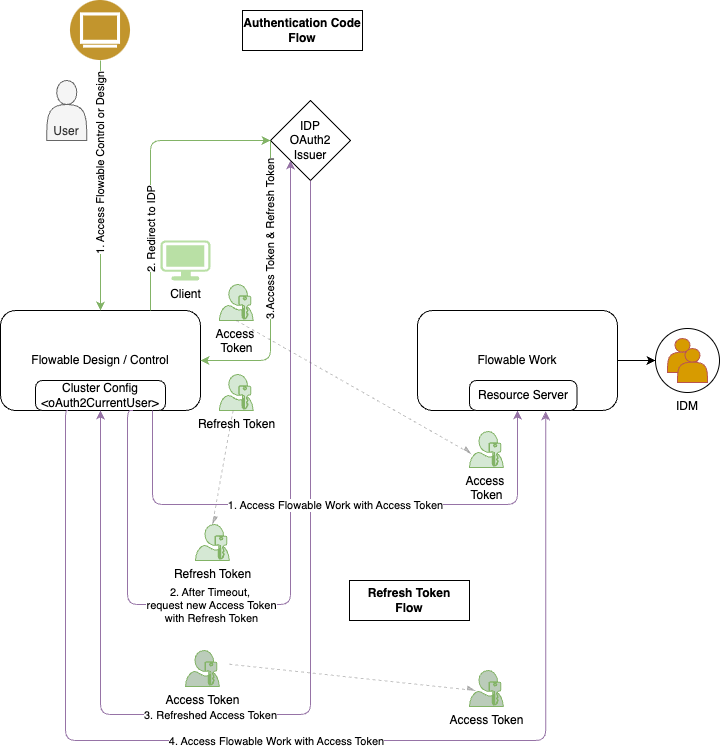
noteTo configure this in OAuth2, only 1 client registration needs to be created.
All 3 applications (Work/Design/Control) MUST use the same registration to prevent issues with the Audience (aud) claim.
Therefore all applications are configured with the same Client ID.
noteAs Flowable Design (in contrast to Flowable Control) does not allow fine-grained permission management within its own application,
the only way to control if users are allowed to deploy apps from Design to Work is to give them appropriate permissions in Flowable Work.
To be able to deploy apps, Flowable Design users need to have the access-deployApp privilege on their user that will be forwarded to Flowable Work.
oauth2CurrentUserAccessToken
If instead of oauth2CurrentUser the oauth2CurrentUserAccessToken authentication type is used,
the authentication flow will be exactly the same, except that instead of the ID-Token
the Access Token (received during the Authentication_Code Login process) will be forwarded to Flowable Work.
Technical User Authentication
The Technical User Authentication can be used in combination with the OAuth2 / OIDC authentication for SSO login of users. It simplifies the authentication setup by establishing a direct authentication between the apps. It only allows service accounts though and no user propagation.
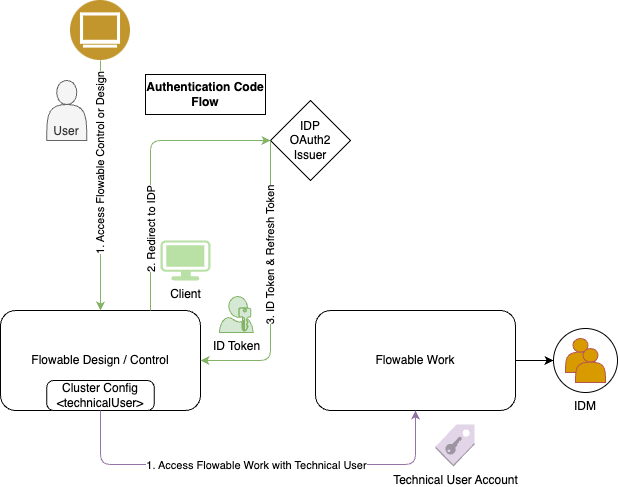
In contrast to the OAuth2 authentication between applications described in the previous chapter, the Technical User Authentication allows a direct communication between the Flowable applications with no IDP and is therefore simpler to configure.
This authentication mechanism assumes, that the 3 Flowable applications can be treated as a unity and that there is no need for an OAuth2 Identity Provider to regulate the access between these applications.
Form-Login / BasicAuth
It is NOT recommended to use Form-Login in production environments.
Form-Login is the out-of-the-box user authentication mechanism provided by Flowable. It allows users to log in with a username and password registered in Flowable internal IDM. For API calls, Basic Authentication can be used to authenticate with the same usernames and passwords.
As Flowable Design and Flowable Control also use the Flowable Work APIs to perform their operations, these applications also need to authenticate with basic authentication. Usually, the admin user account will be used for communication between Flowable applications to allow full access to all APIs.
As Form-Login does not support single sign-on between multiple applications, a user needs to log in to each application individually. Also, the users need to be present in the internal Flowable IDM of each application, preventing the possibility for using a central user management system.
It is therefore not recommended to use Form-Login / BasicAuth in production environments. But it can be helpful for testing or demo purposes, where no centralized user management is needed.