Overview
Flowable Cloud Dedicated allows you to integrate your existing OAuth2 solution to authenticate users for Flowable applications. This means that your users can use their existing credentials to log in to Flowable applications without needing to create new accounts or remember additional passwords.
Single Sign On (SSO) allows users to authenticate once and gain access to multiple applications without needing to log in separately to each application. OAuth2 is a widely used protocol for implementing SSO and is supported by Flowable out of the box.
With Flowable Cloud Dedicated, you can configure OAuth2-based SSO using popular providers like Azure Entra ID or Keycloak. We suggest to use Azure Entra ID as it provides the best integration experience with Flowable Cloud Dedicated.
About OAuth2
OAuth2 uses an identity provider (IDP) to manage a user's identity and permissions within an application. If a user tries to access an application, they will be first forwarded to the IDP that handles the login process (e.g. with 2FA). The user will then be sent back to the application with an access key that identifies them and their permissions. The application will validate that key.
Applications, that are managed by an IDP, are called "Clients" and need to be registered to the IDP. These registrations have different names in the different OAuth2 products. In Azure, they are called "App Registrations", in Keycloak they are just called "Clients".
For the sake of this documentation, we will use the term "App Registration" to describe these registrations.
Configuring SSO for Flowable Cloud therefore consists of 2 parts:
- The configuration of the identity provider by adding the needed App Registrations.
- The configuration of Flowable to use these App Registrations based on information provided by the identity provider.
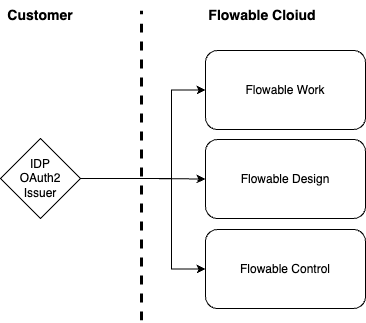
Configuring the customer's identity provider has to be executed by you as the customer. Certain configuration details have then to be delivered to Flowable, so we can configure your Flowable instances for you accordingly.